Automated UI Testing Done Right
[Update 2013-05-03]: SSWTV kindly recorded this session. The video of this session is available from here.
I will be speaking at DDDSydney on 30th of June. You may find the details of the conference and the info about the sessions and the timetable here. If you have not purchased your ticket yet, then leave me a comment or send me a message on @MehdiKhalili to arrange a discounted ticket.
My talk is called Automated UI Testing Done Right and you may find more info about it here.
Background
Two years ago I was very sceptical about automated UI testing. I had some painful experience with it because while writing the tests seemed relatively easy, maintaining them would become harder and harder over time to the point where it was impractical to maintain.
Over the past year or so, I have been investing more in Automated UI Testing. I have had some discussions with guys at Readify about ways to do it better. Michael Whelan, my partner in crime for BDDfy, had also been going through a similar journey, although he was ahead of me. So we started sharing notes and talking about UI testing, and a few ideas started popping up. Some of the videos from the last SeleniumConf were really insightful too. We used these ideas and patterns in some personal and work related projects; but then we thought we may formalize these ideas and patterns and turn it into a framework so others will not have to go through the same pain.
A while back I mentioned a BDDfy has moved to GitHub and is now part of a test family called TestStack. Now there is a new cool kid on the TestStack block. It is called Seleno (thanks Russ Blake for the name).
Introducing Seleno
Seleno, a framework currently written on top of Selenium, helps you have a better experience in Automated UI Testing. The ideas and patterns used in Seleno are not necessarily all new: we have implemented some of the most popular UI testing patterns like Page Object and Page Component. The framework also leverages some of the power of ASP.Net MVC framework to provide strongly typed Page Objects. You may have a look at the project homepage for more info.
I am not going to go through the API or feature set now as it is still under (aggressive) construction and everything I write here is going to be obsolete in a few months; but you may access the code here. The framework is also available for download from nuget:
PM> Install-Package TestStack.Seleno
Automated UI Testing Done Right
… back to my DDDSydney session. The session is about Automated UI Testing Done Right and through out the session I talk about some of the patterns that you can use to improve the maintainability of your UI tests. The session starts with a horrible test which is very typical when teams start doing UI testing. The test looks something like:
// much of the code has been removed for brevity
public void Can_buy_an_Album_when_registered()
{
    _driver.Navigate().GoToUrl(Application.HomePage.Url);
    _driver.FindElement(By.LinkText("Disco")).Click();
    _driver.FindElement(By.CssSelector("img[alt=\"Le Freak\"]")).Click();
    _driver.FindElement(By.LinkText("Add to cart")).Click();
    _driver.FindElement(By.LinkText("Checkout >>")).Click();
    _driver.FindElement(By.Id("FirstName")).Clear();
    _driver.FindElement(By.Id("FirstName")).SendKeys("Homer");
    _driver.FindElement(By.Id("LastName")).Clear();
    _driver.FindElement(By.Id("LastName")).SendKeys("Simpson");
    _driver.FindElement(By.Id("Address")).Clear();
    _driver.FindElement(By.Id("Address")).SendKeys("742 Evergreen Terrace");
    _driver.FindElement(By.Id("City")).Clear();
    _driver.FindElement(By.Id("City")).SendKeys("Springfield");
    _driver.FindElement(By.Id("State")).Clear();
    _driver.FindElement(By.Id("State")).SendKeys("Kentucky");
    _driver.FindElement(By.Id("Email")).Clear();
    _driver.FindElement(By.Id("Email")).SendKeys("chunkylover53@aol.com");
    _driver.FindElement(By.Id("PromoCode")).Clear();
    _driver.FindElement(By.Id("PromoCode")).SendKeys("FREE");
    _driver.FindElement(By.CssSelector("input[type=\"submit\"]")).Click();

    Assert.IsTrue(_driver.PageSource.Contains("Checkout Complete"));
}
Trivia - did you know that The Simpsons live in Kentucky!? ;-)
I then turn that test into a very maintainable test in three steps. The result of the third step looks something like:
public void Can_buy_an_Album_when_registered()
{
    var orderedPage = Application
        .HomePage
        .Menu
        .GoToAdminForAnonymousUser()
        .GoToRegisterPage()
        .CreateValidUser(ObjectMother.ValidUser)
        .GenreMenu
        .SelectGenreByName("Disco")
        .SelectAlbumByName("Le Freak")
        .AddAlbumToCart()
        .Checkout()
        .SubmitShippingInfo(ObjectMother.ShippingInfo, "Free");

    orderedPage.Title.Should().Be("Checkout Complete");
}
At the end of the session I will also provide some pro-tips on what to do and what not to do. These are based on the lessons Michael and I have learnt in the past year or so. There is also a bonus forth step which helps turn your awesome test into a living documentation for your system.
Although I am using Seleno, BDDfy and Selenium in the talk, it is very important to note that the ideas, patterns and tips mentioned in the talk are not related to any particular UI or UI testing frameworks or even web testing. So you can use the same ideas and patterns to test your website or desktop or mobile application using your UI testing framework of choice. For example I have applied similar patterns for testing a WPF desktop application using Microsoft Coded UI Test.
The samples used in the talk are directly out of the Seleno code-base. The samples are structured in a way to make it easy to read and follow and you should be able to easily compare the steps to see how each step improves the tests.
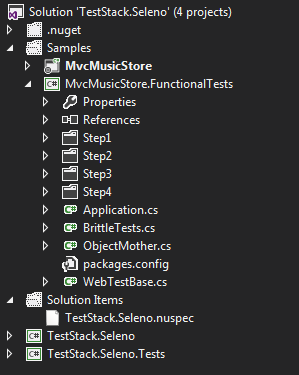
There is a file in the FunctionalTests project called BrittleTests and then there is one folder per step
You may download the zip from here or clone the framework on GitHub.
If you like what you see, come along for the session. There are quite a few tips and tricks to be learnt.
Any ideas, comments, feedback and suggestions about the framework is welcome.