BDD Simply with Bddify
[Update] I have made a LOT of changes on this and have turned it into a fully-fledged BDD framework. So if you are here because you heard of bddify framework then this is not what the framework is. To see the framework please visit its homepage.
In my BDD Simply post I talked about SpecFor
SpecFor is very simple and easy; but I do not like its reports. I really want to have something more readable.
Enter Bddify
In an attempt to provide a better version of SpecFor
public class card_is_disabled
{
    private Card _card;
    Atm _subject;

    [Given]
    void the_card_is_disabled()
    {
        _card = new Card(false);
        _subject = new Atm();
    }

    [When]
    void the_account_holder_requests_money()
    {
        _subject.RequestMoney(_card);
    }

    [Then]
    void the_Atm_should_retain_the_card()
    {
        Assert.That(_subject.CardIsRetained, Is.True);
    }

    [AndThen]
    void the_Atm_should_say_the_card_has_been_retained()
    {
        Assert.That(_subject.Message, Is.EqualTo(DisplayMessage.CardIsRetained));
    }

    [Test]
    public void Execute()
    {
        this.Bddify();
    }
}
To use Bddify you need to decorate your methods with some attributes. The attribute that Bddify cares about is called ExecutableAttribute; but for the readability’s sake I have added a few attributes called Given, AndGiven, When, AndWhen, Then and AndThen. You do not have to use these attributes if you do not like.
And then you will only have one test method from which you call this.Bddify(). This call Bddifies your class!
The success report
If you run the ‘Execute’ test you will see the following report:
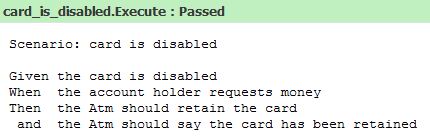
Bddify generates this report for you by reflecting over the test type and its methods. If you do not like underscores in type/method names that is ok. I will provide a solution shortly.
The failure report
Let’s make that test fail by changing one of the assertions:
[Then]
void the_Atm_should_retain_the_card()
{
    Assert.That(_subject.CardIsRetained, Is.False); // Is.True was changed to Is.False
}
When you run the test again you get a failure report like below:
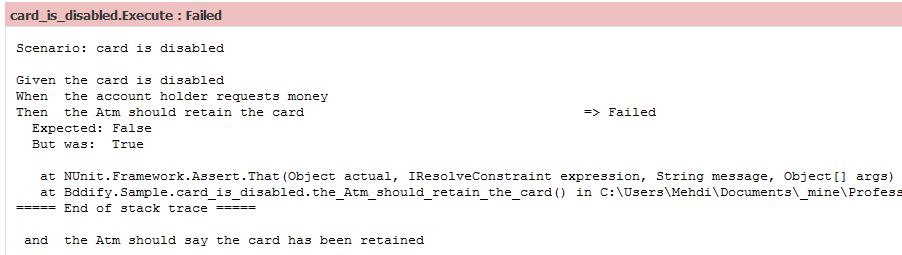
The error and stack trace is the same as you would get if you did not use Bddify. The class also shows you which part of the test has failed by showing a “Failed” text next to the failing bit.
Support for test first development
When you are doing test first development you usually end up creating methods that you do not implement straightaway. The body of these methods usually throws a NotImplementedException.
I usually check-in my changes a bit at a time instead of waiting for a whole feature to be implemented; but I do not want my check-in to break the build. Bddify allows for that. If your code (either the test code or the classes you are testing) throw a NotImplementedException, Bddify will ignore the test for you. This way not only your check-in does not break the build; but you will also know which bits you still have not implemented. Let’s try this:
[Then]
void TheAtmShouldRetainTheCard()
{
    throw new NotImplementedException();
}
I just throw an exception from one of the test methods. If you run the test now you get the following result:

Do not like method names with underscore?
Some developers just do not like underscores in method/type name, and that is quite understandable. For that I have written an extension (if you can call it that, because it is just one line) that allows you to write your tests like below:
public class CardIsDisabled
{
    private Card _card;
    Atm _subject;

    [Given]
    void TheCardIsDisabled()
    {
        _card = new Card(false);
        _subject = new Atm();
    }

    [When]
    void TheAccountHolderRequestsMoney()
    {
        _subject.RequestMoney(_card);
    }

    [Then]
    void TheAtmShouldRetainTheCard()
    {
        Assert.That(_subject.CardIsRetained, Is.True);
    }

    [AndThen]
    void TheAtmShouldSayTheCardHasBeenRetained()
    {
        Assert.That(_subject.Message, Is.EqualTo(DisplayMessage.CardIsRetained));
    }

    [Test]
    public void Execute()
    {
        Bddify.CreateSentenceFromName = BddifyExtensions.CreateSentenceCamelName;
        this.Bddify();
    }
}
The method names and type name now look more c#y! The only difference here is the following line in the Execute method:
Bddify.CreateSentenceFromName = BddifyExtensions.CreateSentenceCamelName;
CreateSentenceFromName is a public static function on Bddify class that you can replace with whatever you like. This is how you can change the way Bddify parses your type and method names. BddifyExtensions is a very small class with two small methods:
public static class BddifyExtensions
{
    public static void Bddify(this object bddee)
    {
        Bddifier.PrintOutput = Bddifier.DefaultPrintOutput;
        var bdder = new Bddifier();
        bdder.Run(bddee);
    }

    public static string CreateSentenceFromCamelName(string name)
    {
        return Regex.Replace(name, "[a-z][A-Z]", m => m.Value[0] + " " + char.ToLower(m.Value[1]));
    }
}
Bddify is the extension method we called in the Execute method, and CreateSentenceFromCamelName is what enabled reporting off the camel cased method names. If you want some other naming for your methods, create your own reporter method and set CreateSentenceFromName to it.
Given, When, Then!
If you do not like GWT attributes and the report, it is not a problem. You can completely change the way report is created by using “extension points” on Bddify. I created few attributes for GWT which I used in the above example. You can create other attributes and use them. All you have to do is to inherit from ExecutableAttribute.
Do not like attributes?
You do not have to use attributes if you do not want to. Here is an example:
public class CardIsDisabled
{
    private Card _card;
    Atm _subject;

    void GivenTheCardIsDisabled()
    {
        _card = new Card(false);
        _subject = new Atm();
    }

    void WhenTheAccountHolderRequestsMoney()
    {
        _subject.RequestMoney(_card);
    }

    void ThenTheAtmShouldRetainTheCard()
    {
        Assert.That(_subject.CardIsRetained, Is.True);
    }

    void AndTheAtmShouldSayTheCardHasBeenRetained()
    {
        Assert.That(_subject.Message, Is.EqualTo(DisplayMessage.CardIsRetained));
    }

    [Test]
    public void Execute()
    {
        this.Bddify();
    }
}
This still provides the same result. Bddify by convention knows how to interpret your method if you method name starts with Given, When and Then.
I want to create some files from my test run
Bddify uses an action called PrintOutput that gets a string and prints it somewhere. The default implementation of the method is:
public static readonly Action<string> DefaultPrintOutput = Console.WriteLine;
public static Action<string> PrintOutput = DefaultPrintOutput;
Just create a method that gets a string and writes it to a file. Then set PrintOutput to your method. I did a very quick proof of concept just to see if this works:
public static class AnotherBddifyExtension
{
    /// <summary>
    /// This is a lame implementation of Bddify.
    /// This is just to show you that it is rather simple to implement a file reporter
    /// </summary>
    /// <param name="bddee">The class to be BDDified</param>
    /// <param name="filePath">The path to the file to be generated</param>
    public static void Bddify(this object bddee, string filePath)
    {
        using (var file = File.AppendText(filePath))
        {
            file.AutoFlush = true;

            Action<string> report =
                s =>
                {
                    Bddifier.DefaultPrintOutput(s);
                    file.WriteLine(s);
                };

            Bddifier.PrintOutput = report;
            var bdder = new Bddifier();
            bdder.Run(bddee);
        }
    }
}
If you use this extension method, as well as the report being shown on the console, a file gets created on the specified path.
Bddify is coupled with your testing framework
My implementation is coupled with NUnit in a few places. I could remove the dependency; but it would mean more code which would make this not-so-lightweight. So I decided to leave it out and do not make my simple BDD library complicated. You have the source code. Feel free to change Bddify to use your testing framework of choice.
Conclusion
That is Bddify. A very simple library that allows you to write BDD tests in a very simple manner and is capable of generating a rather decent report. It also allows you to replace some of its components which I think is handy.
Oh and I forgot to tell you. Bddifier class itself is less than 100 lines of code. With all the extensions and attributes included it is still less than 150 lines.
I still do not have any plans to make this into a real BDD library. Well, the whole point of BDD Simply is to use something very simple and lightweight that you feel comfortable using in your project.
Bddify is not currently perfect and may have some bugs. It is not as feature rich as some of the BDD frameworks out there either. If you need a feature or if you think something could be done differently or to improve it, please leave me a comment.
The source code is available on google code here.
I am aggressively updating the code and adding some features and fixing some bugs. If you are interested in the version I discussed in this article get my first check-in from google code.
Hope this helps.